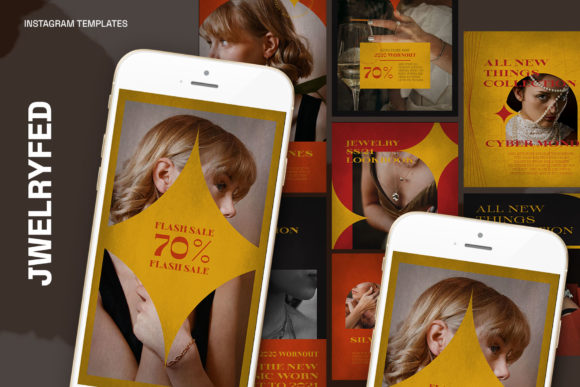
Elevate Your Brand with Jwelryfed Instagram Templates
Standing out on Instagram feels harder than ever. You scroll through a feed of polished, cohesive brands and wonder how they do it. The secret often isn't a massive budget or a dedicated design team; it's a smart system. For many, that system starts with a versatile set of templates. If you're in the business of beauty, fashion, or any visual product, the Jwelryfed Instagram Templates offer a direct path to a professional and consistent feed without the usual headaches.
More Than Just Pretty Pictures: What Are These Templates?
At its core, the Jwelryfed pack is a collection of pre-designed, layered Photoshop files (PSD). Think of them as professional design blueprints. Instead of starting with a blank canvas in Photoshop, you start with a beautifully arranged layout—complete with placeholder text, stylish fonts, and image placeholders—ready for your own content. The "1.13 PSD File" you see listed is your master template file. It’s built with specific technical specs that make it ideal for Instagram: 300 dpi for high-resolution clarity, RGB color mode perfect for screens, and dimensions tailored for both square posts (1200 x 1200 px) and story/reel covers (1920 x 1080 px). This means you're working with files optimized for the platform from the get-go, eliminating guesswork about size and quality.
The Real-World Magic: How People Actually Use Them
The true value of the Jwelryfed templates unfolds in their application. Let's move beyond the feature list and look at the scenarios where they become indispensable.
For the Solopreneur and Small Business Owner
Imagine you're a jeweler, a skincare artisan, or a boutique clothing brand. Your time is split between creating products, managing orders, and trying to market yourself. The last thing you have is hours to learn complex design software. This is where the Smart Object feature shines. The process is famously simple: double-click the image layer, click the layer icon in the group, paste your product photo, and hit CTRL+S. That’s it. Your product is seamlessly integrated into a professional design. Suddenly, you can create a week's worth of cohesive Instagram posts in an hour, not a day. This consistency builds brand recognition, making your profile look established and trustworthy to potential customers.
For Social Media Managers and Agencies
If you manage multiple clients, efficiency is your currency. The Jwelryfed templates act as a versatile starting point. You can quickly adapt the same template set for a luxury jewelry client, a boho-chic clothing line, or a minimalist skincare brand just by swapping out images and editing the text. The fact that all text is editable with the text tool means you can change headlines, call-to-actions, and descriptions to match each client's voice perfectly. This standardization speeds up your workflow, ensures quality control across accounts, and allows you to present a polished proposal or mockup to a client in minutes.
For the Content Creator Building a Niche
Are you a fashion blogger, a makeup artist, or a lifestyle influencer? Your Instagram grid is your portfolio. A disjointed feed can make your profile feel chaotic. Using these templates helps you plan a visually harmonious grid. You can design quote cards, announcement posts, and product features that all share the same design DNA. This curated aesthetic is highly attractive to followers and brands looking for partnerships. It signals that you understand visual branding and take your platform seriously.
Practical Considerations Before You Dive In
While the templates are designed for ease, a little foresight goes a long way.
- You Need Photoshop: This is a non-negotiable. The files are PSD, so you’ll need access to Adobe Photoshop. The good news is that the Smart Object feature works seamlessly in most recent versions.
- Quality of Your Own Assets: The templates will elevate your content, but they can't perform miracles. Blurry product photos or poorly lit images will still look subpar. For the best results, start with clear, well-composed, and high-resolution images of your products or yourself.
- Font Management: The templates use specific fonts to achieve their look. The PSD file will include these, but you may need to install them on your computer for the text to render correctly. This is usually a quick, one-time process.
- Finding Your Voice Within the Framework: A template provides structure, but your brand provides the soul. Don’t just plug in a product and call it a day. Customize the text to tell a story, ask a question, or highlight a unique benefit. The design gets them to stop scrolling; your message makes them stay.
Strengths and Honest Limitations
The strengths are clear: speed, consistency, and professional quality. They democratize good design, allowing small businesses to compete visually with larger brands. The ease of use via Smart Objects is a genuine game-changer for non-designers.
However, it's important to have realistic expectations. Because templates are sold to many users, there's a chance another brand could have a similar-looking post. The key is to customize them thoroughly—change up the color accents where possible, use unique photography, and inject your brand's specific personality into the copy. They are a starting point, not the final destination. Think of them as a well-tailored suit; it looks fantastic, but it still needs to fit you perfectly.
Bringing It All Together
Ultimately, the Jwelryfed Instagram Templates are a tool for empowerment. They solve a very modern problem: the demand for constant, high-quality visual content. For a busy entrepreneur, they are a time-saving ally. For a growing agency, they are a scalable solution. For a creator, they are the key to a polished, professional grid. By handling the heavy lifting of layout and design, they free you up to focus on what truly matters: connecting with your audience, telling your brand's story, and doing what you love. In the fast-paced world of Instagram, that kind of efficiency isn't just nice to have—it's essential for growth.